# Tiller Money Feeds for Excel updates
**URL:** https://community.tiller.com/t/tiller-money-feeds-for-excel-updates/27401
**Category:** News from Tiller
**Tags:** announcement
**Created:** [July 25, 2024, 6:17pm UTC](https://community.tiller.com/t/tiller-money-feeds-for-excel-updates/27401 "2024-07-25T18:17:42Z")
**Posts on this page:** 13
**Page:** 2
### Author:  [@buzzmaster1](https://community.tiller.com/u/buzzmaster1)
#### Post date: [July 29, 2024, 2:33pm UTC](https://community.tiller.com/t/tiller-money-feeds-for-excel-updates/27401/21 "2024-07-29T14:33:49Z")
I did not realize that so I looked at my autocat and it seems fine as it always has.
---
### Author:  [@buzzmaster1](https://community.tiller.com/u/buzzmaster1)
#### Post date: [July 29, 2024, 4:53pm UTC](https://community.tiller.com/t/tiller-money-feeds-for-excel-updates/27401/22 "2024-07-29T16:53:55Z")
So I clicked on create autocat sheet and it did not create a new sheet, it left my existing sheet and allowed me to run autocat. Will test again tomorrow morning after performing a fill.
---
### Author:  [@buzzmaster1](https://community.tiller.com/u/buzzmaster1)
#### Post date: [July 30, 2024, 2:06pm UTC](https://community.tiller.com/t/tiller-money-feeds-for-excel-updates/27401/23 "2024-07-30T14:06:13Z")
Suggestions on the new money feed interface: After filling, show the total of new transactions and balance updates separately. When I initially open the feed, I need to refresh to see that there are updates available and then click again. Seems a bit clumsy.
---
### Author:  [@heather](https://community.tiller.com/u/heather)
#### Post date: [July 30, 2024, 2:08pm UTC](https://community.tiller.com/t/tiller-money-feeds-for-excel-updates/27401/24 "2024-07-30T14:08:38Z")
@buzzmaster1 we have an open bug related to the fill button behavior. We’ll likely introduce the option to hover over the green fill success banner to see the breakout of transactions vs balances filled at some point. We also have a bug filed for the add-in not recognizing that AutoCat is already installed.
@adekunledauda the remove duplicates utility is going away because it was only introduced for cleaning up an issue related to a very specific bug previously in Excel that’s been fixed for more than a year now.
---
### Author:  [@Clint.C](https://community.tiller.com/u/Clint.C)
#### Post date: [July 30, 2024, 3:08pm UTC](https://community.tiller.com/t/tiller-money-feeds-for-excel-updates/27401/25 "2024-07-30T15:08:45Z")
@heather
Today, I received an error message that the Autocat tab did not exist.
I tried @buzzmaster1 workaround and received the attached error message.
> [@buzzmaster1](#):
>
> So I clicked on create autocat sheet and it did not create a new sheet, it left my existing sheet and allowed me to run autocat.

No new Autocat tab was created and the existing one was left untouched. Autocat worked fine after this.
Clint
---
### Author:  [@3beswicks](https://community.tiller.com/u/3beswicks)
#### Post date: [July 31, 2024, 10:59am UTC](https://community.tiller.com/t/tiller-money-feeds-for-excel-updates/27401/26 "2024-07-31T10:59:05Z")
I see the new Split Transaction feature in Excel outputs details of the split to the Note column and not the “Split Details” column if it exists
---
### Author:  [@heather](https://community.tiller.com/u/heather)
#### Post date: [August 6, 2024, 12:58pm UTC](https://community.tiller.com/t/tiller-money-feeds-for-excel-updates/27401/27 "2024-08-06T12:58:01Z")
A post was split to a new topic: [Not auto refreshing & missing transactions](https://community.tiller.com/t/not-auto-refreshing-missing-transactions/27598)
---
### Author:  [@heather](https://community.tiller.com/u/heather)
#### Post date: [August 19, 2024, 1:19pm UTC](https://community.tiller.com/t/tiller-money-feeds-for-excel-updates/27401/28 "2024-08-19T13:19:30Z")
A post was split to a new topic: [Questions about what’s in progress](https://community.tiller.com/t/questions-about-whats-in-progress/27772)
---
### Author:  [@heather](https://community.tiller.com/u/heather)
#### Post date: [September 26, 2024, 3:58pm UTC](https://community.tiller.com/t/tiller-money-feeds-for-excel-updates/27401/29 "2024-09-26T15:58:33Z")
We’re excited to share that today we’ve released the Rule Builder AutoCat features for Microsoft Excel bringing Excel pretty much to parity with our Google Sheets add-on.
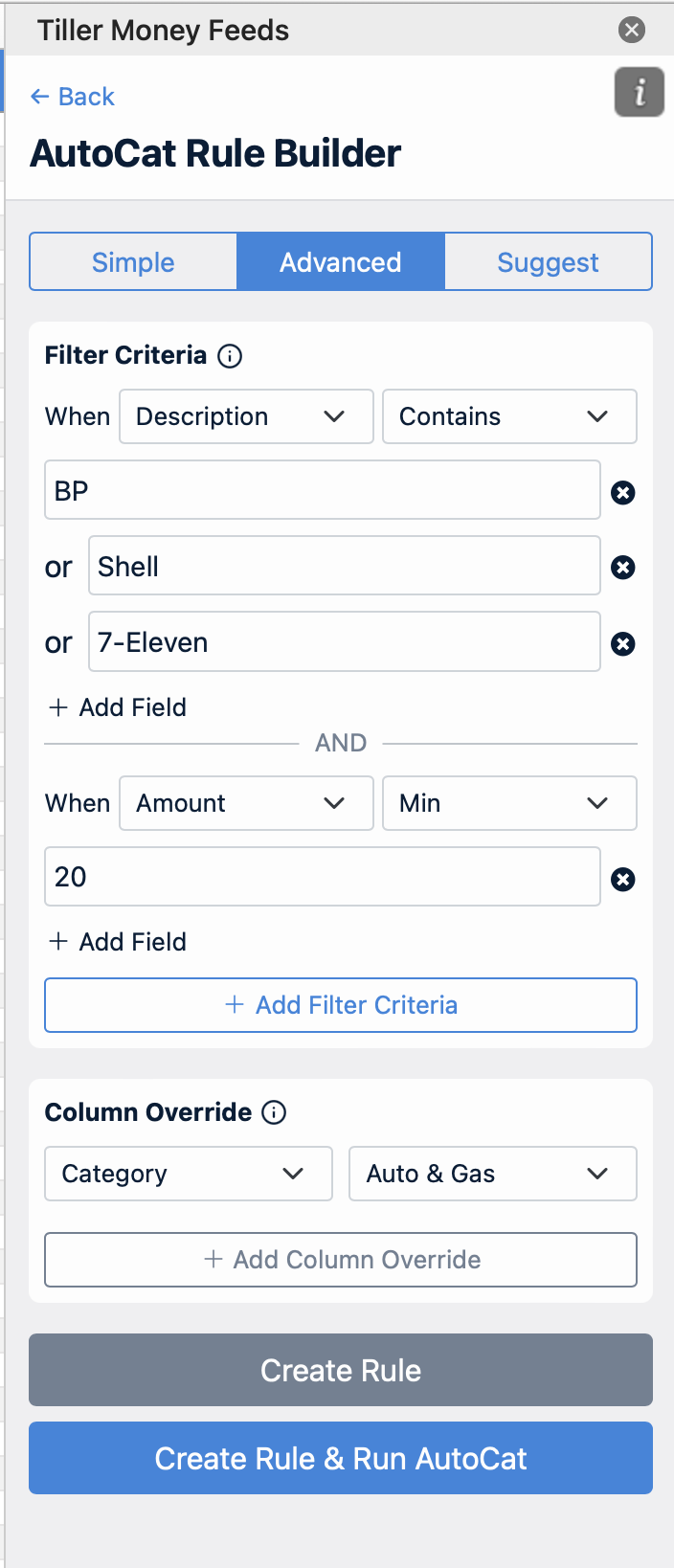
The one area where we’re unlikely to be able to reach full parity is automatic sheet fills. Since most people have their Excel file stored locally on their computer we would not be able to offer AutoFill for those spreadsheets. We haven’t looked into whether we might be able to AutoFill workbooks stored on OneDrive.
---
### Author:  [@Cinistix](https://community.tiller.com/u/Cinistix)
#### Post date: [August 8, 2025, 2:59am UTC](https://community.tiller.com/t/tiller-money-feeds-for-excel-updates/27401/30 "2025-08-08T02:59:43Z")
can we store saved splits to use them like in google sheets?
---
### Author:  [@heather](https://community.tiller.com/u/heather)
#### Post date: [August 8, 2025, 6:29pm UTC](https://community.tiller.com/t/tiller-money-feeds-for-excel-updates/27401/31 "2025-08-08T18:29:56Z")
I haven’t tested it @Cinistix, but it might just already work. Have you tried testing it? I think the same format of the saved splits sheet would work if you just copy/pasted the headers into a tab called “Saved Splits” in Excel.
---
### Author:  [@Cinistix](https://community.tiller.com/u/Cinistix)
#### Post date: [August 11, 2025, 1:21am UTC](https://community.tiller.com/t/tiller-money-feeds-for-excel-updates/27401/32 "2025-08-11T01:21:56Z")
Looks like that did it. Awesome, thnaks
---
### Author:  [@twalane](https://community.tiller.com/u/twalane)
#### Post date: [August 18, 2025, 3:23pm UTC](https://community.tiller.com/t/tiller-money-feeds-for-excel-updates/27401/33 "2025-08-18T15:23:52Z")
Thanks for the update!
[Previous page](https://community.tiller.com/t/tiller-money-feeds-for-excel-updates/27401.md?page=1)