
 Hey everybody. New here and really liking the customization of Tiller so far. I have googled and am still coming up a bit confused on how to do this. So the first week of every month I get a monthly bonus from the prior month based on revenue. That bonus is combined with my first check of every month. On the bank side, I just take the amount received and subtract my base pay and transfer the difference to my savings account. With Tiller, it shows the total amount of my check(base plus bonus) as income. But it also shows the transfer into my savings as a positive along with the transfer from checking as a negative. So it’s showing the total amount as income for the month. If I don’t edit the original deposit it shows as cashflow and at that point it is not in my checking account, it’s in savings. How can I show this so that it records the total amount of my check as income but also shows me reducing that amount by how much I transfer to savings? Thanks for all your help and I really hope I explained that correctly.
To get some more details first do you have a category set up for savings and checking or is it combined? Because if it’s combined it’s going to show both base + bonus as income because that’s that actual case.
if you have Savings and checking as separate accounts so long as you label the check coming in as income and the transfer to savings as either reduction in income or the same income category it’ll reduce it to the base pay. Then for the transfer into savings line you’ll have that categorized as income as well. when you have only the checking account showing it’ll only show the base income in the checking account and same for only bonus income in the savings account.
Hopefully that makes sense, if not what report do you have to show your income for the period and what accounts and categories do you have pulled?
I don’t have any account separating them. I’m basically using the template supplied due to me being new to Tiller. It’s got a Paycheck category set as Income and a Transfer category set as Transfer. I do have my checking and savings account linked tho.
If I am understanding correctly, if I show my whole check as income, and the transfer to savings(as a negative number) as income as well, it will reduce my whole check by the transferred amount? How would I show the transfer to savings as income for the savings account? I’m not understanding how to perform the income into my savings and not have it affect my cash flow for checking. Here are my categories I have set up.

Ahh so yes default; your earlier understanding is correct and you have a copy of options here. Most reports will ignore the transfer category. So if you want this specific transfer/split to show up you’ll need to create a new category, say “income split” and have that coded as income & income.
Then code the corresponding two lines of transfer (out from checking and in to savings) and it should show. [all three transactions, check incoming, + 2 transfers will now be under income]
But if this transfer is what you intend for all transfers you can just set the current transfer as “income” & “income”
Ok. Starting to make sense. So I’ve created an Income Split category with income and income. Is this what I will code that specific check every month? How is that different than just using paycheck? How exactly should the transfer out of checking and the transfer into savings be categorized? Just run both as transfers that kind of “cancel” each other out?
Check $xxxx is under Income Transfer and group and type are income.
Transfer out of checking(negative amount) is under ?
Transfer into savings(positive amount) is under?
You can use the paycheck category, it just depends on how granular you want to see and use the data, if you don’t think you’ll ever need to see actual paycheck coming in vs what you have re-categorized you can just use that category.
If it’s the same process each month then yes. as you go though the tiller functions you can use the autocat function to label them for you.
it’ll be like this; i forgot what some of the headers were but hopefully this illustrates better the trans:

(remember if you code both as transfer, you’ll end up with the same issue as the beginning)
Ok. So I set it up as that one check as income. Once I entered the 2 transfers it still is showing that whole check as income for total income. I need it to reduce the total income by the amount transferred for an accurate amount of what is being kept in my checking for the month. I basically don’t want to see that bonus. When I set it up as reference above, it doesn’t deduct that hypothetical amount from my check. Basically as in your example above, if I get a $5000 check and transfer $1000 out of checking, I want the income for that month to only let me see the $4000 left over.
I’m not entirely confident I understand what you’re asking, so please correct me if I’m not getting to where you want.
Probably what I would do is use the split transaction tool and split your paycheck into two transactions: your regular paycheck and the bonus part. You can categorize the bonus income however you’d like, but I would still categorize it as income rather than expense or transfer. You can exclude that bonus income category from reports if you’d like on the Categories sheet under the Hide From Reports column. The transfer transactions should balance out.
For example: let’s say I got a third paycheck this month because I’m paid biweekly, and I want that to go to high yield savings. That check would come in through my direct deposit to checking, and that transaction would get recorded (we’ll call it $2,000). I then institute a transfer through my banking app to high yield savings. That increases the balance by $2,000 in that account, and decreases the balance of my checking by $2,000. My overall net worth does not change and neither does my actual cashflow, because the transfer out and transfer in are both recorded as a transfer and not an expense or income.
Is your savings account also linked to Tiller?
I can see what you are explaining there. What I am basically attempting to show, it my deposit with my bonus comes into my checking account. I only want to keep the part of my check that would be my base pay in that account. So I transfer the difference between the check that is deposited and my base pay into my savings. I want my monthly spend to be based solely on my base pay. I do have both my checking and savings linked to Tiller.
Ok. I think what you want to do is that split transaction and transfers. You can exclude the transfers from monthly reports and you can set your income budgets in the Categories sheet to just be whatever your base pay is. I would continue to categorize the split transaction of bonus pay as income, and track that separately, as it will affect your net worth, but that would allow you to just exclude it from any other usual monthly budgeting if you’re trying to use something like a 50/30/20 rule.
I kind of do this with my wife’s income because hers is highly variable based on the number of hours she gets. We have sort of a base floor that we expect she is usually going to bring in no matter what based on her minimum number of hours. If she picks up extra shifts, that just gets included in her paychecks. I don’t split those transactions, but at least some of the money that she makes over her floor we send partly over to her personal checking where she gets to spend that unaccountably. That account is linked to Tiller, but I exclude it from reports and anything from that account just gets categorized automatically as from my wife’s slush fund and I don’t ask any questions about it. We base our monthly budget on that floor. (If we have extra, we can decide to up some budgets to allocate it, but we don’t have to.)
You don’t have to have your category budgets match your overall income. If you have extra cashflow, that’s great! One of the nice things about Tiller is that it can be super flexible and you get to decide exactly how you want to track your finances and spending.
I picked a bad month to start this as we have a lot of home renovations going on so transfers from saving to checking and so forth are constant. I also transferred more than normal to savings this month which will not match up with months going forward. I like the split option. Ideally, my transfer to savings will match what I actually send to that account to get an accurate representation of how much i actually pull in each month. I will keep messing with it until my numbers match the way I want them to. But being I transferred more than normal it is throwing my actual amount to budget off of into the hills.
Are you manually recording transactions? All that should be pulling and calculating automatically and you shouldn’t need to mess with it to make numbers match. Ideally, your sheets/workbook should be giving you a clear and precise picture of what you have coming in and what you have going out. There can be a lot of different ways to do that based on the foundational transaction and account data.
What sheets are you using with Tiller, just the core Foundation Template sheets? There may be some community templates that might help you organize this a little more, but it might be helpful for me to see some screenshots of what you’re actually using and how. (Please feel free to redact any sensitive information!)
My checking and saving account are linked. But this month I have transferred more than I normally would from my first paycheck with my bonus. So instead of keeping my base pay in my checking account I transferred almost the whole base pay and the bonus to savings. I typically don’t do that so that transfer of such a larger amount than normal is throwing off my total income for this month. Let’s say I typically transfer $1500 from that check on the first week of the month. That would leave me hypothetically speaking $6000 left to budget with. Well, I transferred double that amount so my income for this month is significantly less that what I am spending. So I already have a negative cash flow for the month.
How are the transfers being categorized? Are they going between your checking and savings as income and expense? On your Categories sheet, what do they look like? Here’s mine, for example:

On Categories sheet I am using the template supplied during joining. I have only a paycheck category as income and income. I also have a transfer category as transfer and transfer. All of my checks are input as paycheck and every transfer from savings to checking or checking to savings is a transfer. I have not added any other Categories until I know which will work best for my budget. Trying to keep is simple for now and not make it so I don’t want to use it like the 8 apps I downloaded before this and cancelled.
No worries, always good to start slow.
Would you be willing to try hiding the transfers from reports and see if that impacts your cashflow data in Spending Trends (unless you’re using another sheet to track your cashflow)? There should be a column for “Hide From Reports” and just type “Hide” in the row for the transfers.
I may also still not be quite understanding what you’re looking for it to do. Tiller will include all of the cash in and cash out across all your accounts. If you want to exclude certain accounts from that cashflow data, then we’re looking at doing something else. Are you looking to exclude what goes in and out of savings from your cashflow data?
Not really. So I basically am trying to see how much I have left over every month after all my income has been recorded and all of my payments/splurges/ bills have been paid. I then want to see where I can cut to deposit more into savings. I am not charging on any credit cards. I have 3 left and am paying them on. I have a couple small loans and a mortgage. The rest are living expenses like electric, cell, food. I want to track what I have left over after all of those are paid and I want to use my base pay as the number to deduct all of those from. My issue is my first check includes my bonus from the previous month. I need to show that part of that check gets moved to savings and does not count as any amount available to spend anywhere on my budget.
Ok, you might like the community template Savings Budget. I rely on that and that’s what makes sense to me. It basically creates digital “envelopes” that can roll over from month to month. I’ve altered mine a little bit to give me a better sense of how much of my two main accounts are already accounted for by envelopes.
There’s also a couple of budget builder community templates that you can add to Tiller to get a rough idea of what your expected expenses are compared to your base income and then make decisions from there. I think that’s probably what you really want here based on what you’re describing.
I guess I thought that was the point of the budget template. Income minus expense equals cash flow. That should be what is left over. I think if I just take that larger check and do a split transaction with the amount going to savings as a transfer that would work. Then, when the transfer shows in my feed as coming out of checking and then going into savings couldn’t I just list those as transfers as well. Or would that double up the amount going into savings since I did the split transaction? That’s how I would like to see it I guess. But I don’t know what “Type” to categorize the move.
I think you seem to be describing two things here.
One seems to be planning what you expect your budget to look like, and the other seems to be tracking what your actual income and spending looks like. You can do some of that with just the Foundation Template sheets.
On the Categories sheet, you’ll see something like this:

You can put in what you expect those will be, and it’s totally ok to delete categories and rename them here. So, if you’re paid biweekly, and you know what that base paycheck will be, you can just put that expected amount in. It doesn’t have to be the actual amount: that’s what we’ll talk about actuals for later. By default, this will expand to the end of the year period.
Let’s just say I think I make $2,500 per pay period as a base wage and I know I get paid on the 1st and 15th of every month. I can plan that I will make $5,000 per month. I know I also occasionally get overtime, but this is inconsistent. I’ll just put in $5,000 per month, because that’s predictable.

Then I can start filling in my expected expenses. For myself, when I first started doing this planning, I sat down with my accounts and I printed off a statement of several months and started highlighting patterns. I could see what my expenses that basically never changed were: mortgage, insurance, phone and internet, that kind of stuff. I wrote those all down and added those up.
Some of those can be variable, like utilities. I found a community template that someone put together with a table of each month’s utility bills for electic, gas, and water. I modified that a little to give me an annual total and a monthly average and charted that out.
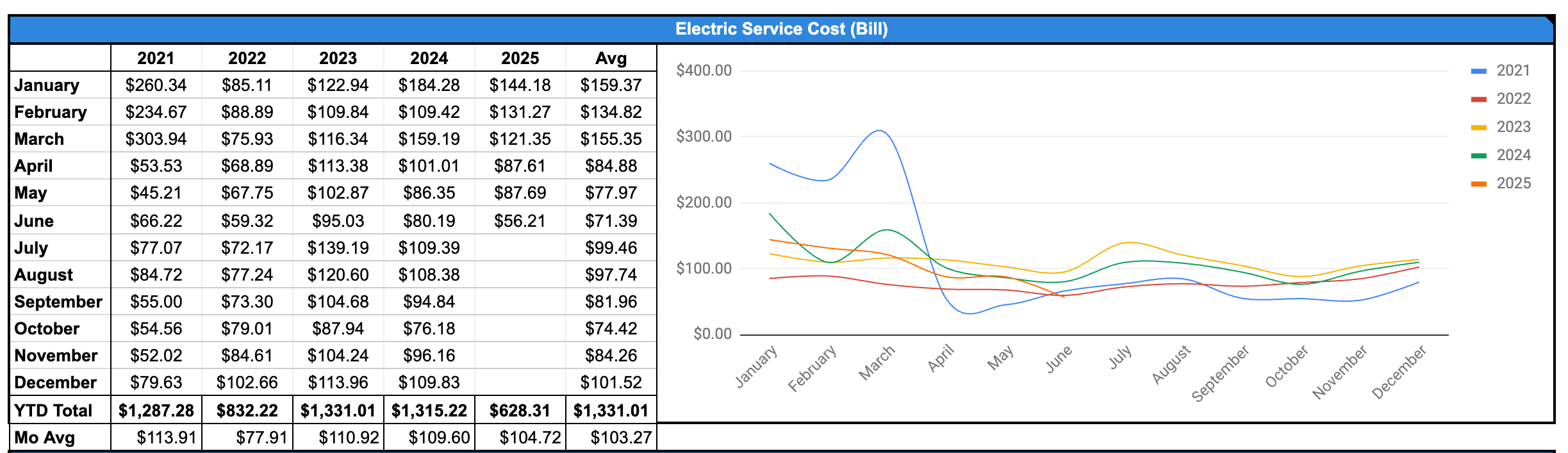
(I’m a couple months behind on data here, sorry, please excuse the mess)
I used that monthly average to calculate out how much I needed to put in my utility budget every month. You could either change that every month based on how you think things will increase/decrease, which would let you decide if you want to allocate the extra or decrease in any given month, or you could just use the monthly average knowing that some months will be higher and some months will be lower. I use a digital envelope budget, so I use the monthly average and let those envelopes build during the less expensive months and know the money will be there in an account when the winter hits because it’s easier for me to budget if the amount stays consistent.
You can then put in all your numbers and see where you land. For example, here’s some just sample data I made up:

This will give you your budget plan when you do all of it. Now, that doesn’t tell me just straight out how I’m doing with allocating my expected funds. But what I can do is select all my expense categories for the month and look down in the lower right corner, where it will say “SUM:”

So it looks like right now, based on my initial budgeting, I have expected positive cashflow! Hooray!
This is all just expected budget. Later, after we have some transactions, we’ll be able to see our actual spending, or what we around here call actuals. There’s a couple of Foundation Template sheets you can use to see how your expected is stacking up against your actuals. One is the Monthly Budget:

Another is the Yearly Budget:

I don’t have any transaction data in this sample Tiller workbook I slapped together quick for training purposes here, so sorry about that.
These sheets are where you’d compare how you expected to be doing vs. how you’re actually doing. The actual data will pull from your Transactions sheet and Balance sheet.
You could definitely help track this for your regular and bonus income, using the Split Transaction tool. You can take your paycheck that has bonus income and split it into a Paycheck category and a Bonus Income category, and add that Bonus Income category on your Categories sheet. Now, you don’t know what that bonus income is going to be! So, it’s perfectly ok to just leave it at $0 for each month on the Categories sheet.

I just made up a little bit of training data here for some transactions.
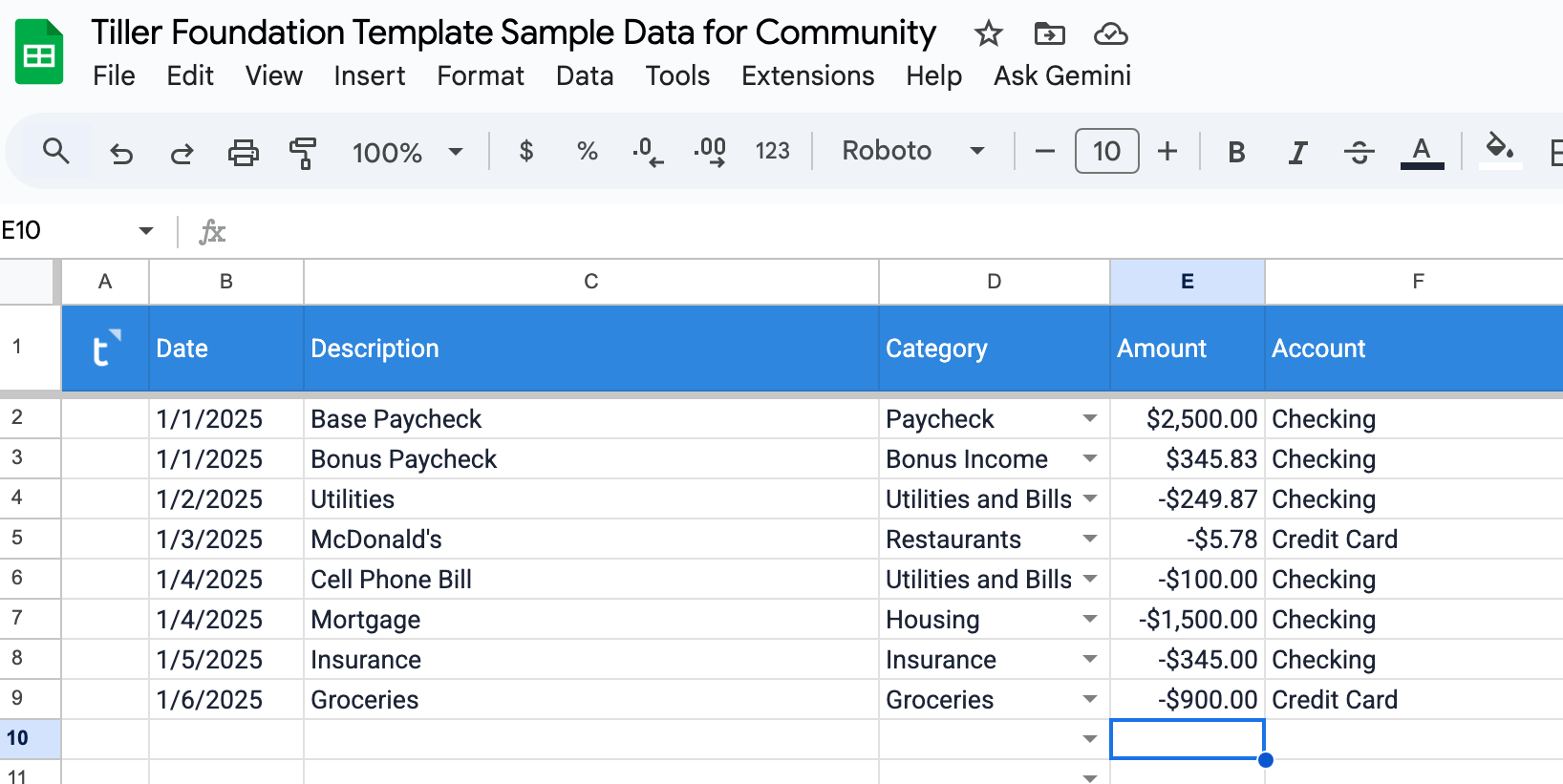
Let’s see how this shows up on the Monthly Budget:

If we add a transfer of that bonus income to savings, it should do this:

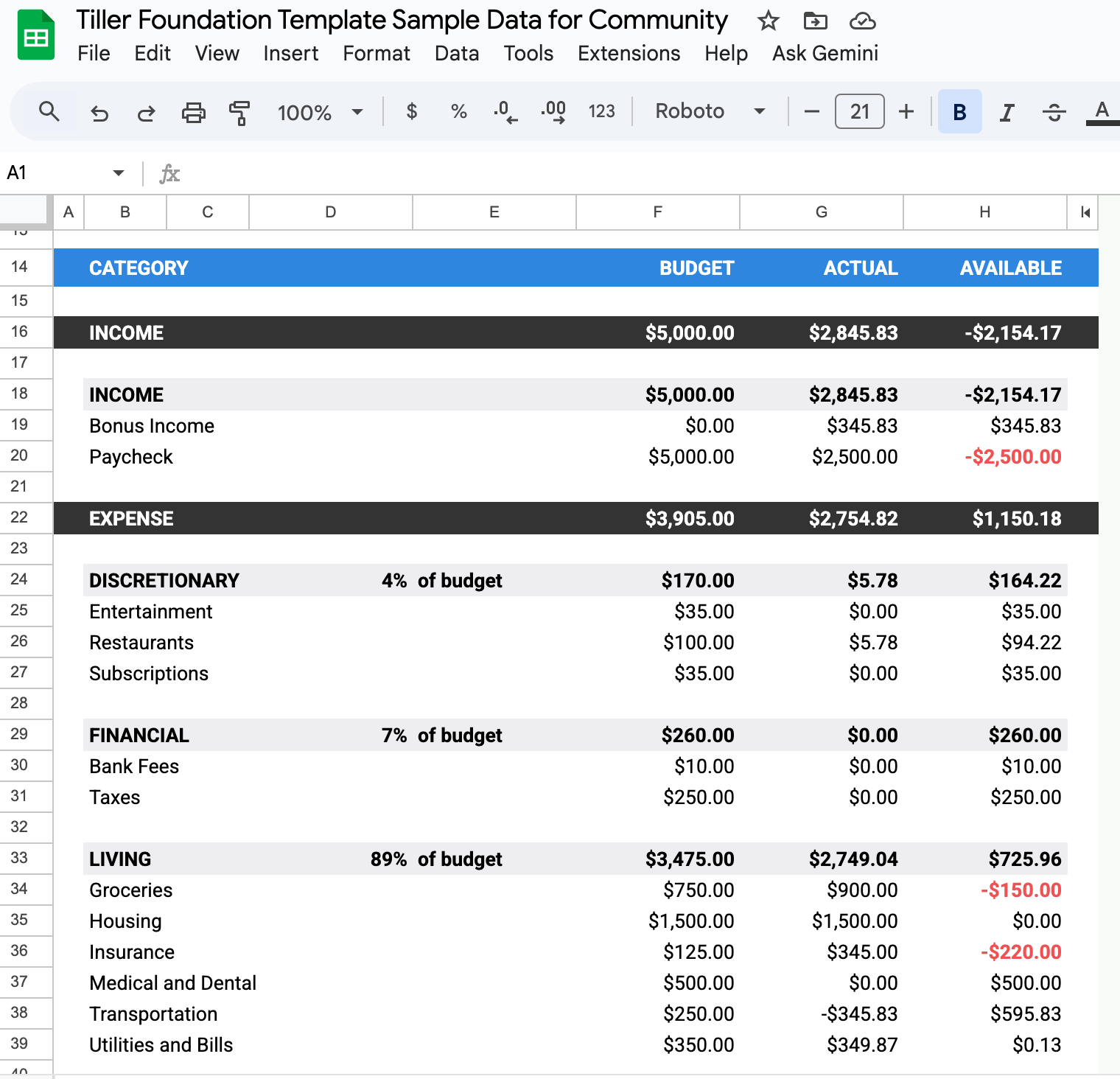
So, that doesn’t affect our cashflow data here in Monthly Budget, but lets us see how that bonus income for the month is in the mix with our actuals. If I exclude that bonus income from reports, it just doesn’t show up here.

Does this help explain things better or give you what you’re looking for? Is there something I could expand on here more or help you with in your sheet specifically?