
I have a manual account that is paid off. I have set it to hide in the Accounts tab but when I go to Tiller Money Feeds>Manual Accounts it still shows in the drop down. I don’t want to go thru the process of deleting everything, since it was once a valid account with payments to it. I just don’t want to see it show up in the Manual Accounts dropdown anymore. Is there a way to do this?
Hello @mpresley410, the “Hide” is only hide from reports not from the accounts page.
This help page might give you some guidance.
There is a hidden sheet you’ll want to remove it from.
-Alice
Tiller Evangelist
I saw the article on removing the balance history. So, in order to remove it from the list i have to delete historical data? What if i ever want to go back and see how much the original balance was?
On your Balance History sheet:
Filter the Account column to only show the manual account of interest.
In the Account ID column, change manual: to manualhide:
Copy-paste-values-only the new Account ID for all the relevant rows (they are all the same).
Remove the filter you added to only show the manual account of interest.
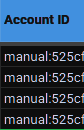
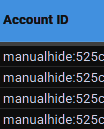
The key is that the Account ID doesn’t begin with manual: - I just arbitrarily chose manualhide: for something somewhat meaningful.
This won’t prevent it from showing up in reports, but now it won’t be recognized as a manual account.
BRILLIANT!!! That is exactly what I was wanting; to hide it from the list of manual accounts. Thank you so much, that worked perfectly!